RaceHub: self-driving car races, in the browser and on TV
A competition server for an internal league of 1:10 self-driving cars, raced in simulation: uploads, fair races on one old laptop, a TV broadcast with a director's desk, and the league's simulator running in a browser tab. A tour of what's there and how it was built in three days.
João’s company is planning an internal competition for self-driving cars, about a year from now: 1:10 RoboRacer cars (the series was called F1TENTH until 2025), and a first season in simulation. In October 2026 he asked Claude to find the rules. An hour later he asked for a server to run it on: both simulators, a website, about six participants, weekend sessions, competitions, and a way to look back at runs.
Three days later RaceHub had all that, a broadcast for a TV or a stream, and the league’s own simulator running in a browser tab.
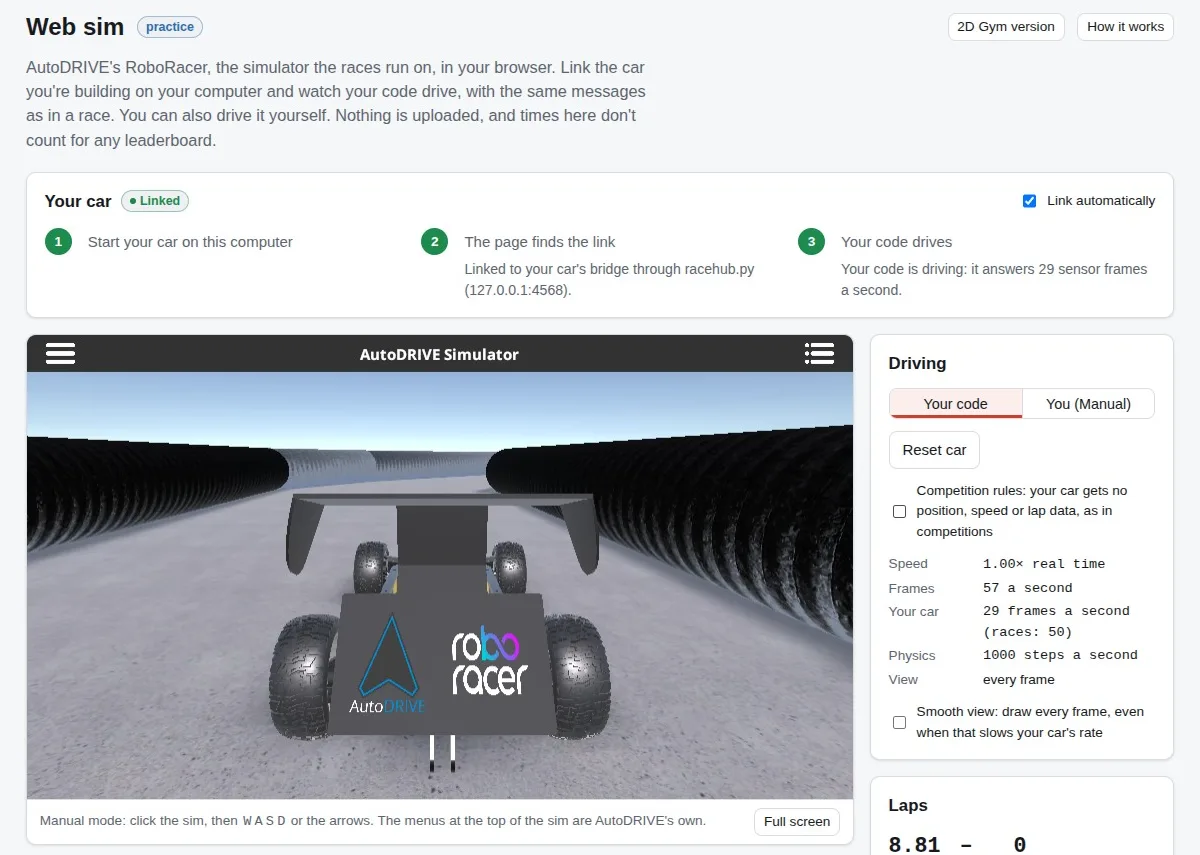
The screenshots come from test copies with made-up drivers. The real server holds colleagues’ names.
How it fits together
- A car is a Docker image. A ROS 2 stack in the official sim league’s format: upload a workspace zip, pull an image, or upload a
docker savearchive. - A referee runs each race. It starts a simulator and the car, sits between them speaking AutoDRIVE’s bridge protocol to both, counts laps and penalties, and records every message.
- Two simulators, one car. AutoDRIVE, the Unity simulator the official league uses, runs headless. F1TENTH Gym is 2D and was taught to send AutoDRIVE’s messages, so the same image races on both.
- One recording. Every run is an MCAP file of ROS 2 messages. The replay, the live view, the TV and the download all read it, and it opens in Foxglove or
ros2 bag play. - A plain stack. FastAPI, Jinja2, SQLite and JavaScript modules, no build step.
- One old laptop. A Clevo with a 2015 i7 and a GTX 965M is both the dev machine and the live server.
For the participants
- Two minutes to a first race. The invite link leads to a checklist. «Start from the example racer» builds a car on the server, «Race it now» races it and opens the live view. No Docker needed for that.
- A command line.
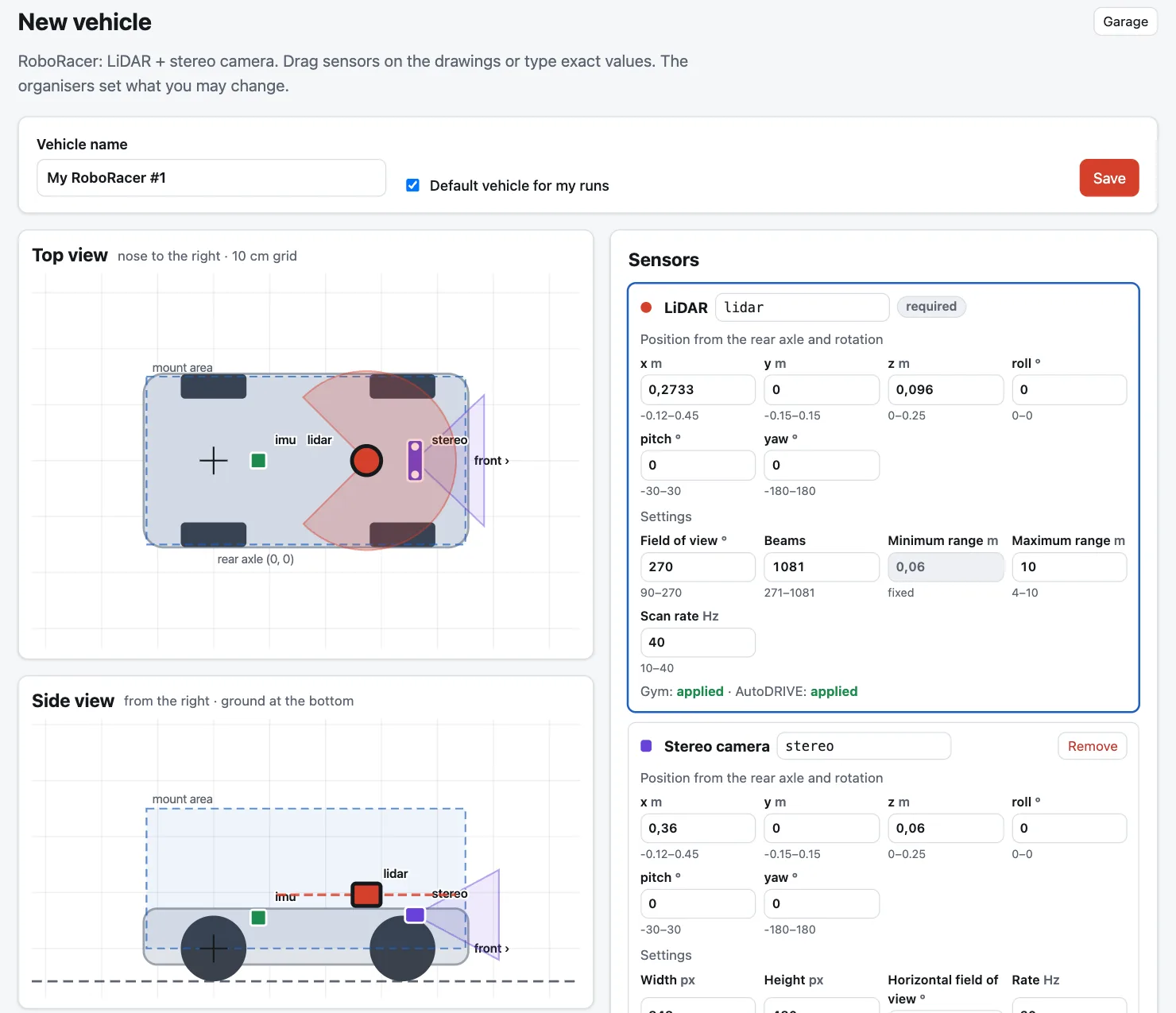
racehub.py, plain Python, set up with one copy-paste from the account page.push,runandstatuscover the loop;localbuilds the car the way the server does, andconnectraces it from the participant’s own machine against the server’s simulator. - A garage. Sensors are placed by dragging them on drawings of the car. The organisers set what may change, and the page says what each simulator applies.
- Sessions. Weekend practice windows with live leaderboards, competitions on hidden tracks, free test runs. Races with several cars start from a grid, on Gym for now.
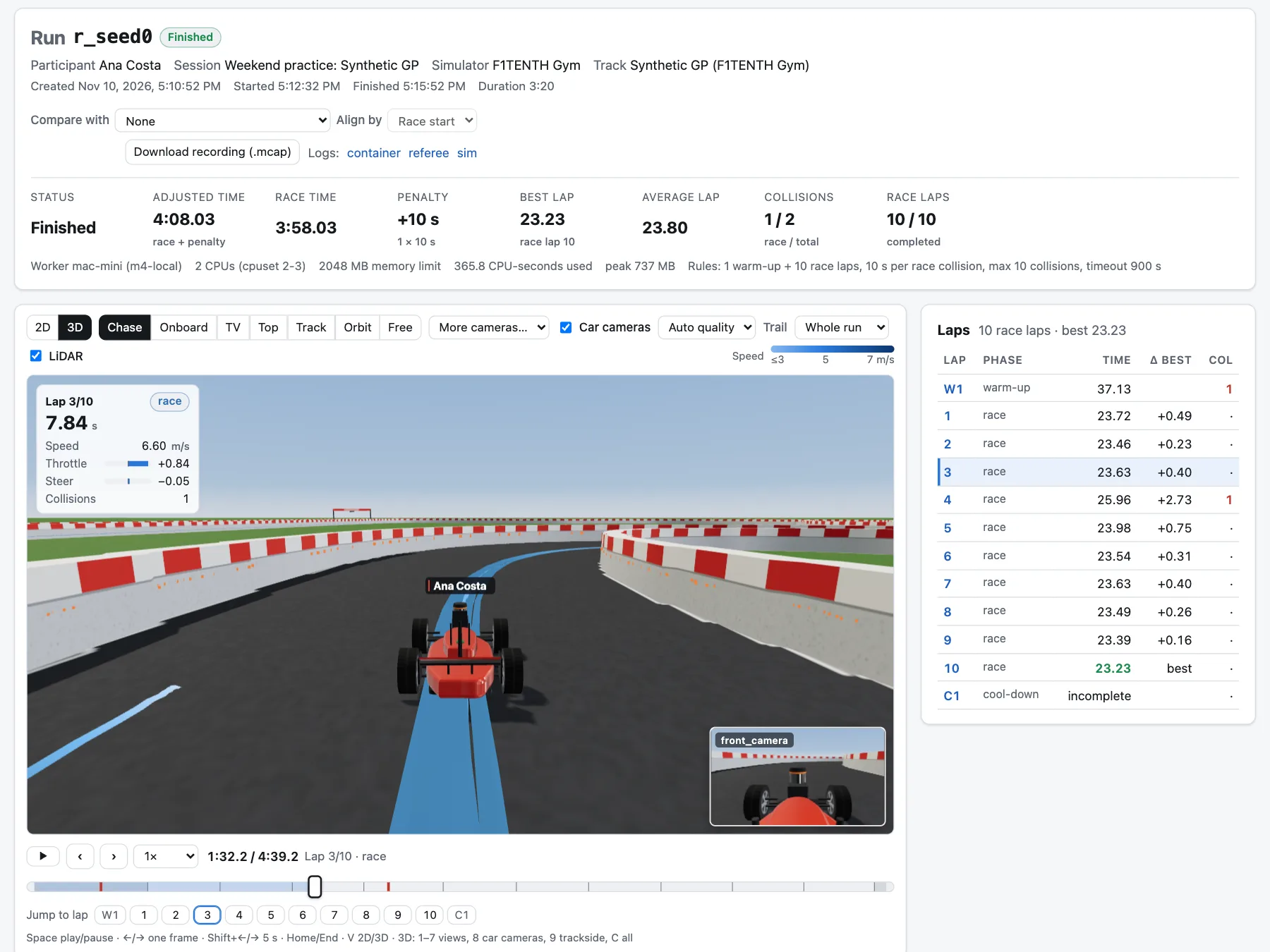
- Every run, replayed. Track map, LiDAR, speed, throttle and steering charts, the lap table, a comparison with another run, and 3D views from a chase cam to the car’s own cameras.
Fair races on one laptop
- Each race gets its own CPUs. Two, pinned, with fixed memory, no swap and no internet. Builds get other cores and a sandbox whose only way out is a proxy to public sites.
- Official runs can have the machine to themselves. Nothing else starts until they finish.
- Sensors only in competitions. The referee blanks position, speed, lap and collision data before the car sees them, as the league’s rules ask.
- A security review on day one. 3 high and 9 medium issues. Two of the high ones: an uploaded
docker savearchive could replace the base image everyone builds on, and a Dockerfile could startFROManother participant’s image and copy their code. Both were closed the same afternoon.
On TV
The broadcast came on the first afternoon: João asked for a viewer mode for a TV or a stream, then for a page to choose what’s on it.
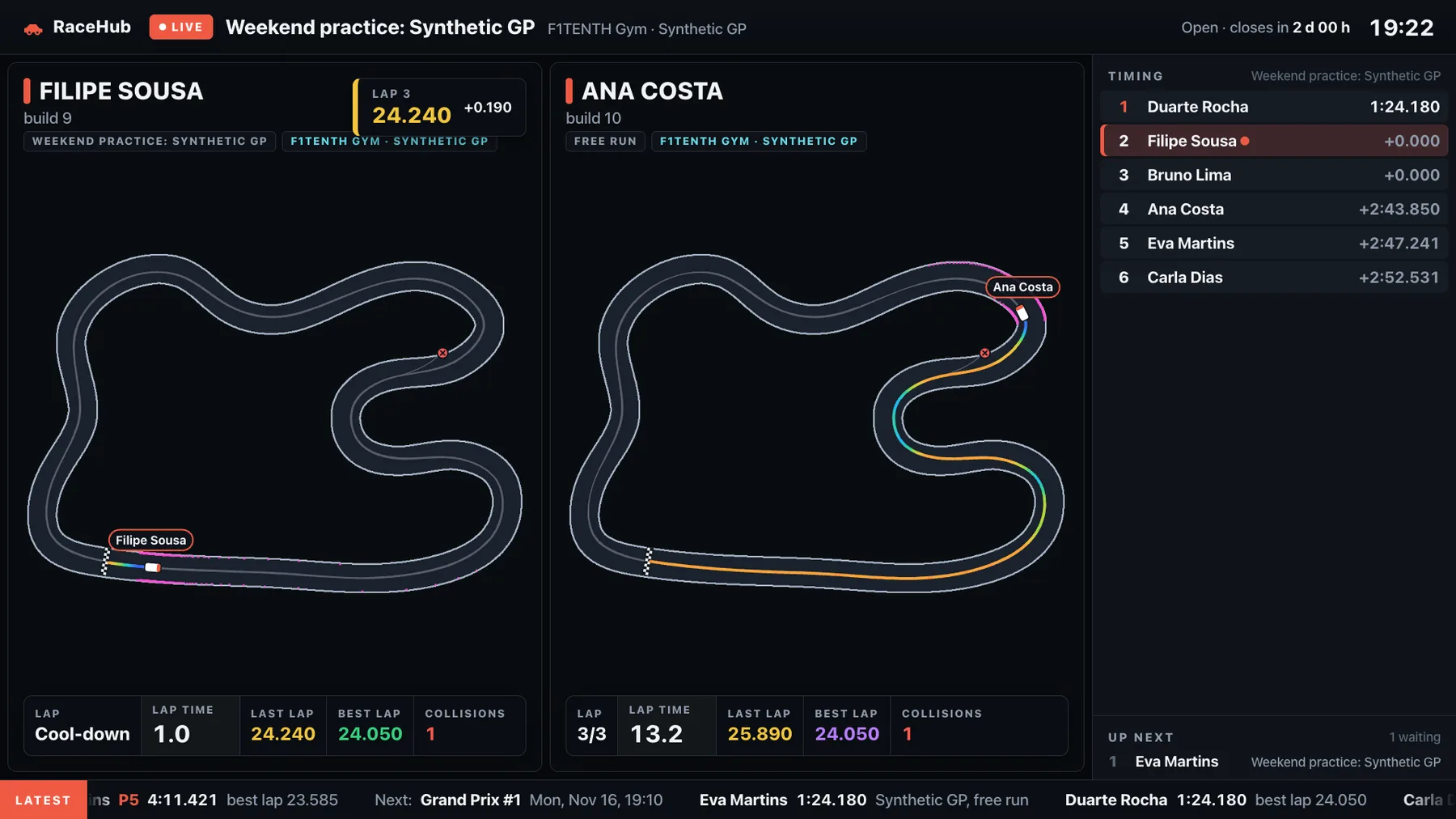
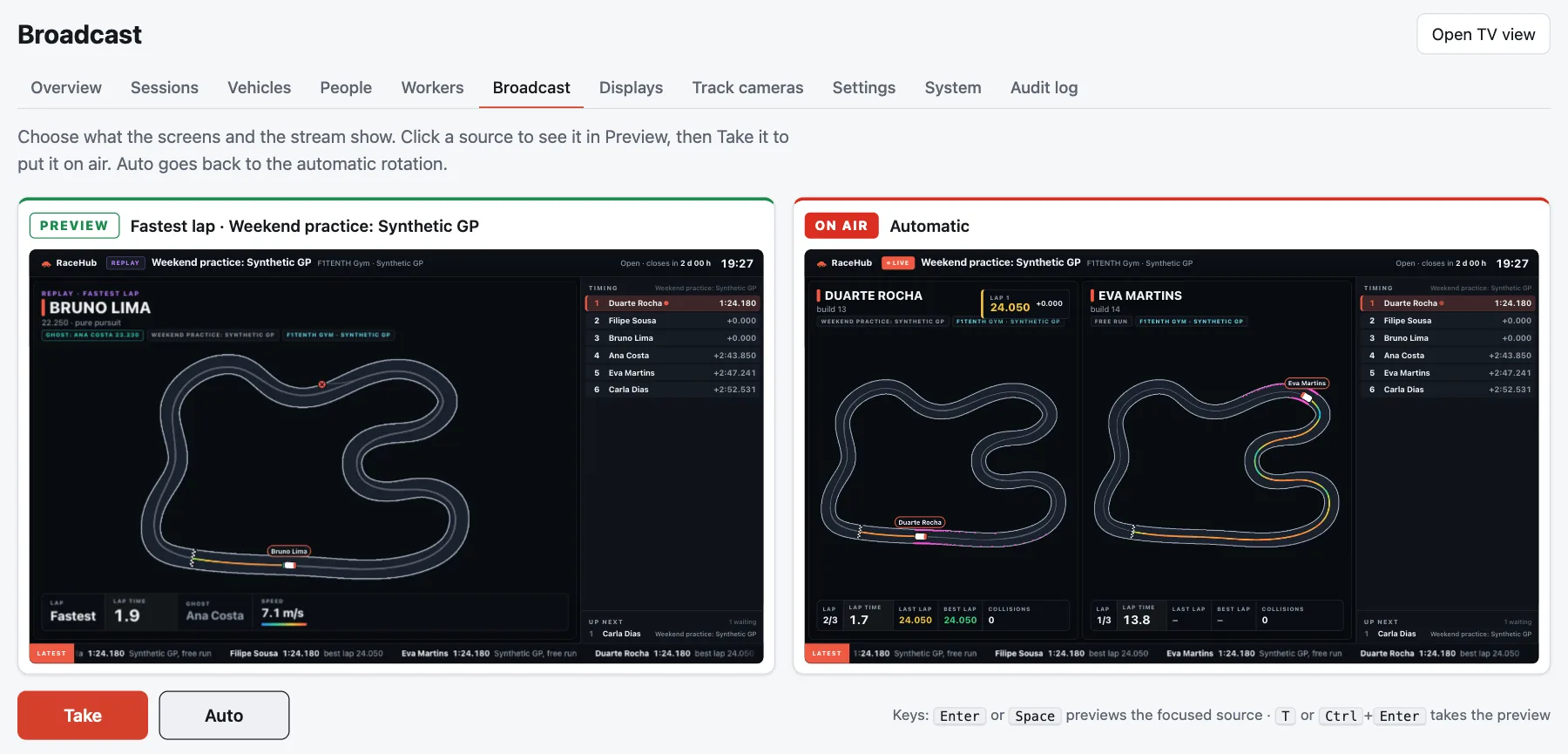
- The TV page. Every car live on the track map, with its speed trail, LiDAR, lap and collision pop-ups, the timing tower, who’s up next and a ticker of results. With nothing on track it cycles leaderboards, the fastest lap replayed with the runner-up as a ghost, the latest results and a countdown.
- Screens. A TV shows a six-letter code and an organiser pairs it from the admin. OBS takes a display link as a 1920×1080 browser source. Spectators without an account get a link of their own.
- A director’s desk. Admin → Broadcast works like a vision mixer: pick a source, see it in Preview, Take puts it on air, Auto hands it back to the rotation. A banner goes on every screen, and slates like «Starting soon» fill the gaps.
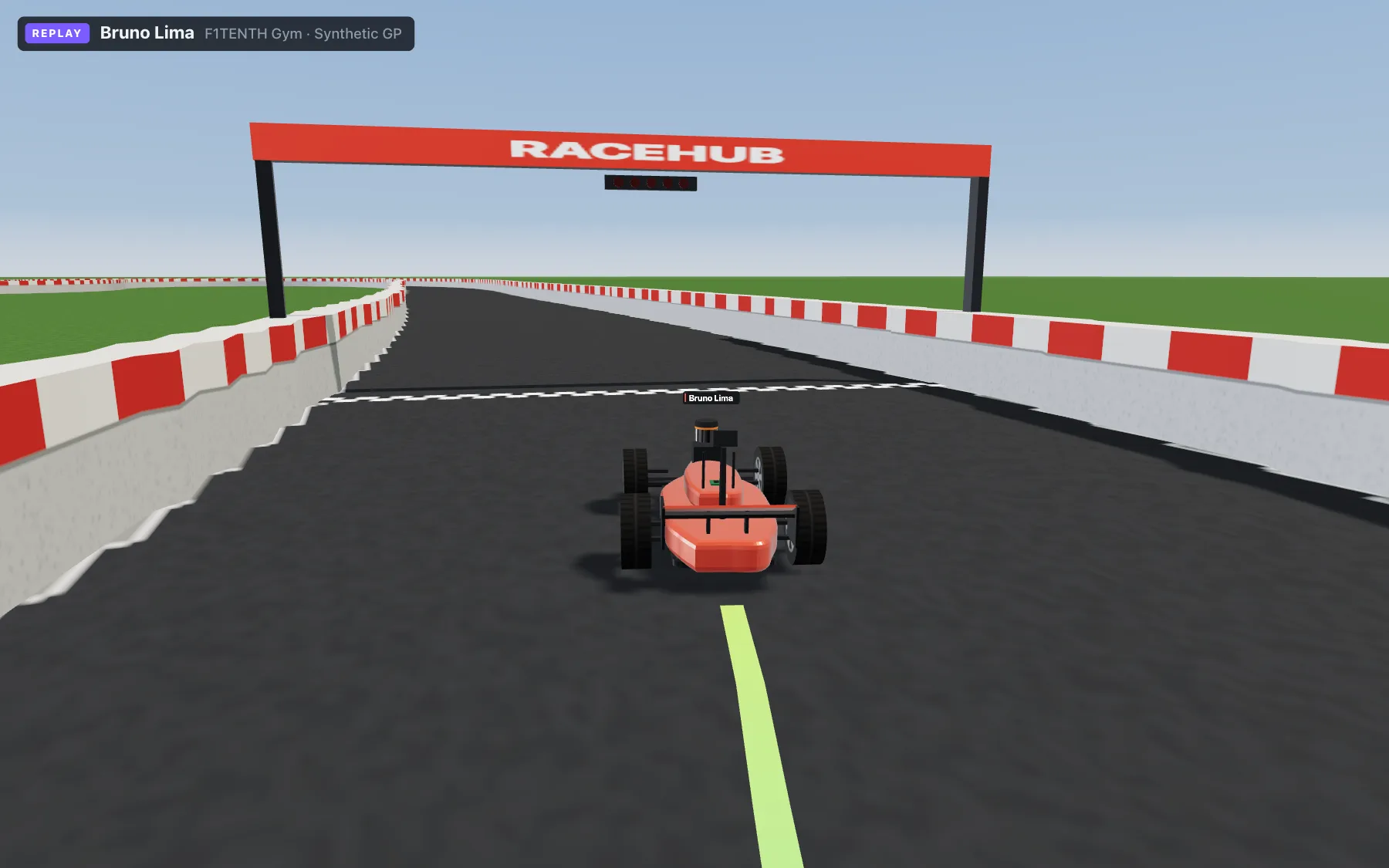
- Trackside cameras. Organisers place cameras per track, and the 3D scenes cut between them like a race broadcast.
Rebuilding the simulator
On day two AutoDRIVE’s limits showed. The released builds hold one car per scene, the Linux builds can’t render cameras, and on the Clevo the official build answered about 11 times a second. So AutoDRIVE got rebuilt from its source, in Unity 2022.3, on the same laptop.
- The simulator’s link to the referee. It was capped at about 22 messages a second by Nagle’s algorithm: the simulator’s WebSocket library never set NoDelay. With it set, 57.
- Cameras at 60 fps. João wanted stereo cameras at 848×480 and 60 frames a second. HDRP gave 24 on the GTX 965M, 37 with lighter settings. A port to URP, Unity’s lighter renderer, gave 57. Two cars with stereo cameras run at about 47 each.
- Two cars in one scene. The rebuilt simulator has a two-car scene, and the referee speaks to it. Live races still use the official builds.
The simulator in the browser
Late on the second day João asked for the simulator on the web, for practice and learning.
- The same car, unchanged. RaceHub’s fork of AutoDRIVE, built for WebGL.
racehub.py simbuilds and starts the car like a race would and links it to the page. The devkit’s bridge refuses connections from a browser, so the link opens the WebSocket the way the AutoDRIVE app does and passes the bytes through untouched. - Real time on a 2015 laptop. Measured in a browser on the Clevo, on its GTX 965M and on its Intel graphics alike. The example racer lapped in 13.5 to 14.2 s, as on the native build.
- Practice rules. A wall hit leaves the car where it hit, so you see whether it recovers. Going back to the last checkpoint, as in races, is a tick box, and so is hiding position and lap data like a competition does.
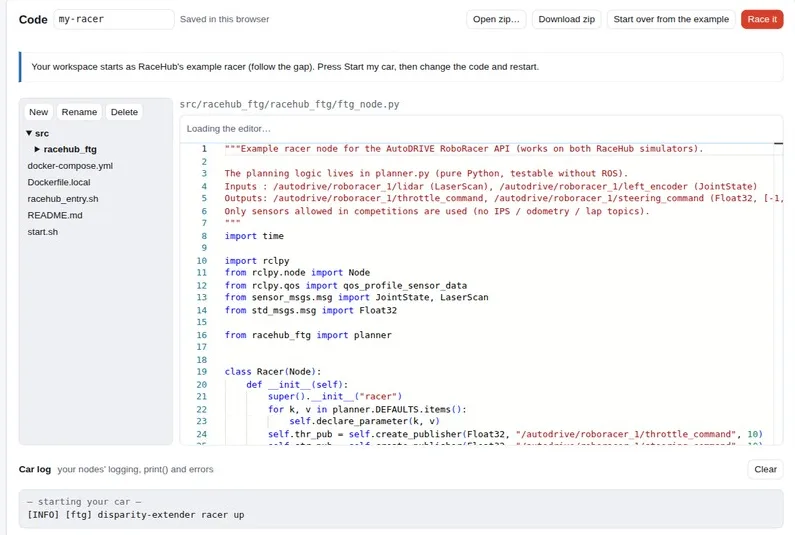
What came instead was the car’s Python in the page. Pyodide runs the participant’s ROS 2 workspace with a stand-in for rclpy, its messages and launch files, so the same code races on the server. VS Code’s editor edits it, and «Race it» uploads it. «Wait for slow code» holds the simulator’s clock when the car answers late. The example racer lapped in 13.66 s, as fast as the reference laps. That evening João asked to switch it off for now; an organiser can turn it back on.
Unity 6 got a trial too. Physics got 15 to 25 % cheaper in Chrome, drawing got slower, and WebGPU couldn’t be measured at all. The web sim stays on 2022.3; the branch is kept.
The workflow
It started on the Mac, on the external SSD, with up to five Claude Code agents at once. The next morning, after the SSD dropped out and took the server down, João asked for one machine for dev and hosting, with deploys of a few commands, ideally one. RaceHub moved to the Clevo that day, 239 files and about 49,000 lines by then, and Claude Code moved with it: it runs on the laptop, opened from the Mac over SSH.
- One command.
./deployruns the tests, pushes to GitHub and to the live repository, prepares a new release while the old one serves, switches only when nothing is racing, checks its health and rolls back by itself. - Everything pinned. AutoDRIVE builds by checksum, Docker images by digest, Python packages in a lock file.
- Dev and live on one laptop. Live races keep their own cores. Dev servers race fake drivers on their own data, which is where these screenshots come from.
- Plans first. Big changes start as a plan João approves.
Since the move: 33 commits and more than 20 releases in a day and a half. About 31,000 lines of Python, tests included, 14,000 of JavaScript, and 259 tests.
Where it stands
In beta on João’s local network; the league is about a year away. The last change is from 23 October. Next in the record: two-car races on AutoDRIVE, HTTPS (threads and WebGPU in the browser need it), and Cloudflare Tunnel with Access for when it leaves the LAN.